Manners, decoded
Video chat etiquette with strangers comes down to a few habits: keep the camera on yourself, keep money and pressure out, and let the Report button deal with rule-breakers. It works on any site where you talk to strangers.
Strictly 18+ · After an 18+ tick our video chat opens; then the browser wants your camera and mic.
Quick answers before you connect
What happens when you press Report?
Skip, often labelled Next, only swaps the face on your screen for a new one. Report passes the account to the service, along with the reason you picked. What happens afterwards is known only from each service's own description: StrangerLine, for instance, says it combines AI filtering with human moderators around the clock.
Can you screenshot a funny moment?
Ask first, and accept a no without argument. Your match agreed to a conversation, not to a permanent copy of their face in a stranger's camera roll. Once a screenshot leaves your phone, neither of you controls where it travels.
Is it OK to ask where someone lives?
Their country, certainly, if they volunteer it. Anything narrower, like a suburb, a street or a school, is theirs to share and not yours to investigate. Keep your curiosity on the conversation, not on the map.
What should you do if a match looks under 18?
End the conversation immediately and report the account, choosing an under-age category if the form offers one. Don't lecture or question them first. The service can act on a report; a stranger in a chat window can't.
Five terms, defined
Rules notice
The short list of dos and don'ts a service shows on its start screen or inside the chat window.
Report reason
The category you tick when flagging an account, such as spam, nudity or someone who looks under age.
Ban
A block the service places on an account or device after a rule break, so it can't join new chats.
Bystander
Anyone in your room, or passing through it, who never chose to be seen by a stranger.
Screen recording
A saved video of the call, sound included, made with the phone or computer's own tools.
Six manners that work on any stranger chat
Video chat etiquette travels well. Services word their rules differently, yet the same short list keeps a conversation pleasant for both sides. Nothing on it requires a setting or a premium upgrade.
Where do written rules end and manners begin?
Rules answer one question: what gets an account removed? OpenTalk's answer is a short list of forbidden behaviour that ends in a ban. Other services use their own vocabulary, and what each site bans, side by side, has a page of its own.
Manners answer a gentler question: would this person happily keep talking to you? No service enforces that, and no filter sorts for it. You set that standard yourself, in every conversation.
Why shouldn't you push someone to turn the camera on?
Because the pressure itself is the problem. A camera reveals a face, a room and sometimes the street outside. Someone who keeps it switched off may be protecting exactly that. They don't owe you an explanation.
Camera rules belong to the service, not to you. Some services write a live camera into their terms and enforce it with their own tools. If you'd like video and your match wouldn't, say a quick goodbye and start another conversation. That's basic video chat etiquette, and it spares you both an awkward negotiation.
Where does money fit into a chat with a stranger?
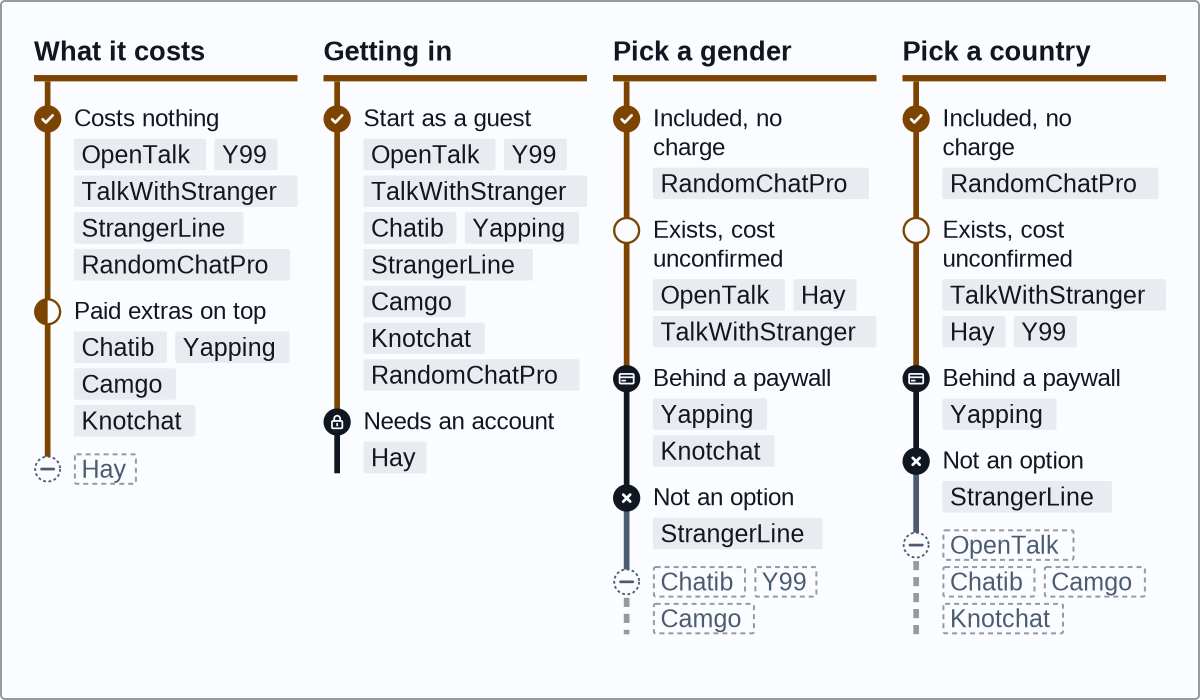
Nowhere between the two of you. Any price belongs to the platform itself and is settled on its own screens, never passed from one stranger to another. The chart further down sorts the ten services in this site's records by what they sell.
A match who mentions gifts, crypto, a sick relative or a "verification fee" is following a script. The usual money tricks in stranger chats are easy to recognise once you've seen them described. Close the conversation before the second request.
What if you're the one who got it wrong?
It happens. You pushed one question too far, or a joke landed badly. Apologise in a single line and change the subject. A short apology beats a long explanation every time.
Shared something you now regret? End the conversation, because a message can't be unsent from someone else's screen. Good video chat etiquette includes that kind of repair.
The etiquette section's other articles cover more awkward moments in detail. For everything else about meeting new people online, head back to the Next Seat home page.
Manners in one breath
Keep the camera on yourself and the conversation clear of money, pressure and captures. Ask once, then drop it. Keep your full name, address, school, workplace and any document or ID card out of the chat and out of shot, and watch for a window that shows your street. When a match crosses a line, use the report button, then move on.